CS I · Test Corpus

Every schematic, anchor, and reading passage that could appear on the Oct 1 midterm — these are the actual artifacts you may see on the test. Nothing on the printed test comes from outside this page. If it is not here, it is not on Thursday.

The three Google Docs you read this week are your Midterm’s Content Corpus — the source material that explains this test corpus. Chunks of that content run through MuggsOfStudy into your printed study guide.

Mid Term Prep Day 1 · What an AI Model Is and How It Runs

Aug 31 – Sep 14, 2026

Reading passages

Each passage prints above its cluster of four items on the test.

Passage 1

What a pane is

A pane is a model. Pane 1, pane 2, and pane 3 are three different models, running at the same moment, given the same prompt and the same instructions. The only thing different about them is size. They stay in the same order all week, so pane 2 on Thursday is the same model as pane 2 on Monday.

Passage 2

Check the source first

The prompt goes to all three panes at the same moment. Same instructions, same clock. If a pane's answer contradicts something a student already knows to be true, the check is not against another pane — it is against the source. A wrong answer that sounds confident is still a wrong answer. The five on-screen numbers under each response tell you how long the pane took and how many tokens came back, but they do not tell you whether the words are correct.

Passage 3

The four criteria

Day 3 introduced four criteria for judging a response: correctness, completeness, clarity, and usable-this-week. Correct means the claim can be checked against a real source and comes back true. Complete means the response covers the parts the prompt asked for. Clear means a stranger could read it once and understand. Usable-this-week means the advice could be followed by a tenth-grader in New Orleans without money, equipment, or another person's cooperation.

Passage 4

Speed is two different numbers

Speed on this screen is not one number. Time-to-last-token is the wall-clock seconds from when the prompt was sent to when the pane stopped writing. Tokens-per-second is how fast the pane was writing while it was writing. A pane can be slow at both, fast at both, or one of each. A short answer that finished in three seconds may have been generated at ninety tokens per second; a long answer that finished in ten seconds may have been generated at forty. Both numbers matter for a different reason.

Passage 5

Observation, narrative, audience

An observation is a note you made for yourself while something was happening. It did its job at the time. A narrative is an account of what happened told to somebody who was not there. Same facts, different reader. That reader is your audience, and today the audience is the whole thing. Every change you make comes from asking one question: would a person who was not in the room understand this?

Passage 6

Claim, evidence, limit

A claim is a sentence that says what you found — one specific thing, small enough to be checked. Evidence is the piece of data you point at to support the claim, cited with the day and the number. A limit is a sentence that names what your evidence cannot show. Every strong Conclusion has all three. A claim without evidence is a guess. Evidence without a claim is a number floating in a page. A limit without either is an apology.

Anchors

Short claim panels the item pool draws from. Recognize them; the test items will paraphrase and vary.

Anchor 1

A model is a file

A model is a file that sits on a disk. When the tool starts, the file is loaded and the model is ready to answer. When you send a prompt, the model reads it, produces a response, and stops. The file does not change while it is answering.

Anchor 2

Frozen numbers

Inside the file are numbers — parameters, set once when the model was trained. Frozen numbers means the parameters are fixed. Any difference in responses cannot come from the model. It has to come from the prompt, the instructions, or the moment.

Anchor 3

Size in gigabytes

Model files are measured in gigabytes. More parameters means a bigger file. A model file must fit in the machine's memory to run — into RAM if running on the CPU, into VRAM if running on the GPU. Not enough memory means the model cannot run.

Anchor 4

CPU vs. GPU throughput

A CPU handles a few things at a time in order. A GPU runs thousands of small operations at once. GPUs were built for graphics, and the matrix math that runs an AI model has the same shape. Tokens-per-second climbs on a GPU and drops on a CPU-only path.

Anchor 5

Words, characters, tokens do not agree

The model does not read words. It reads tokens. A tokenizer splits text into small pieces the model can process. Words vs. characters vs. tokens are three different ways to count the same text — they never all agree on the same number.

Anchor 6

Nondeterminism

Even with the same prompt, the same model can produce different outputs across runs. The model samples from a range of possible next tokens rather than always picking the top one. A single run is a single sample from that range.

Anchor 7

Hold everything except the variable

A controlled comparison holds every variable steady except the one you want to measure. Lab 1 held the prompt, the instructions, and the moment. Only model size varied. That is why differences between panes could be blamed on size.

Anchor 8

One draw, single pass

The tool sends the prompt once and takes what comes back. There is no follow-up, no regeneration, no editing after submission. One draw. Everything measured was measured on a single pass so no student could nudge the result into their preferred shape.

Schematics

Diagrams that appear in items on the test. Study the labels; questions will name them.

Schematic 1

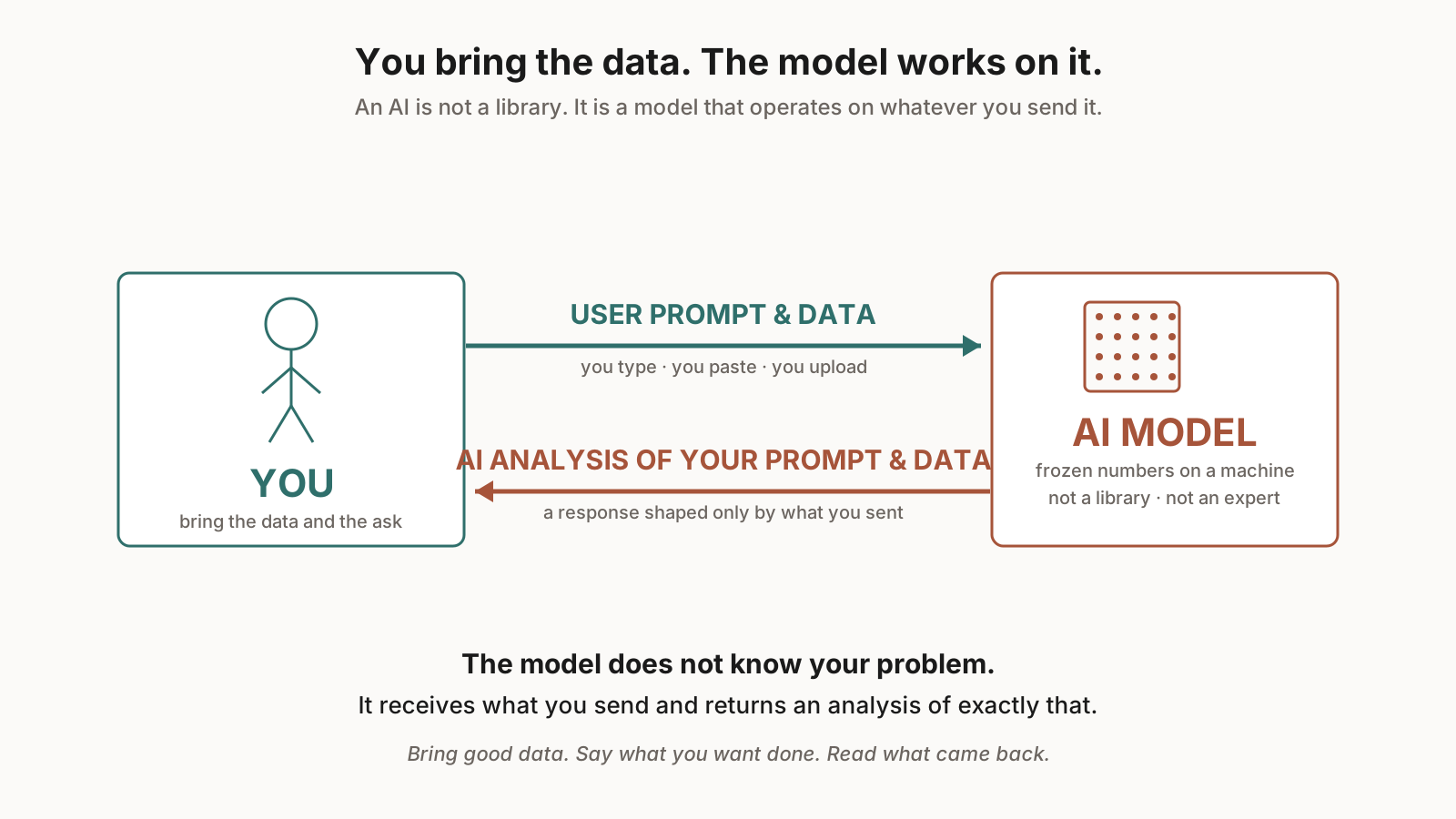
You and the model

You and the model

Left, YOU. Right, the AI MODEL. The top arrow (USER PROMPT & DATA) goes from you to the model — everything the model has to work with is what you sent. The bottom arrow (AI ANALYSIS OF YOUR PROMPT & DATA) comes back the other way — a response shaped only by what you sent. An AI is not a library and not an expert; it is a model that operates on whatever data you bring.

Schematic 2

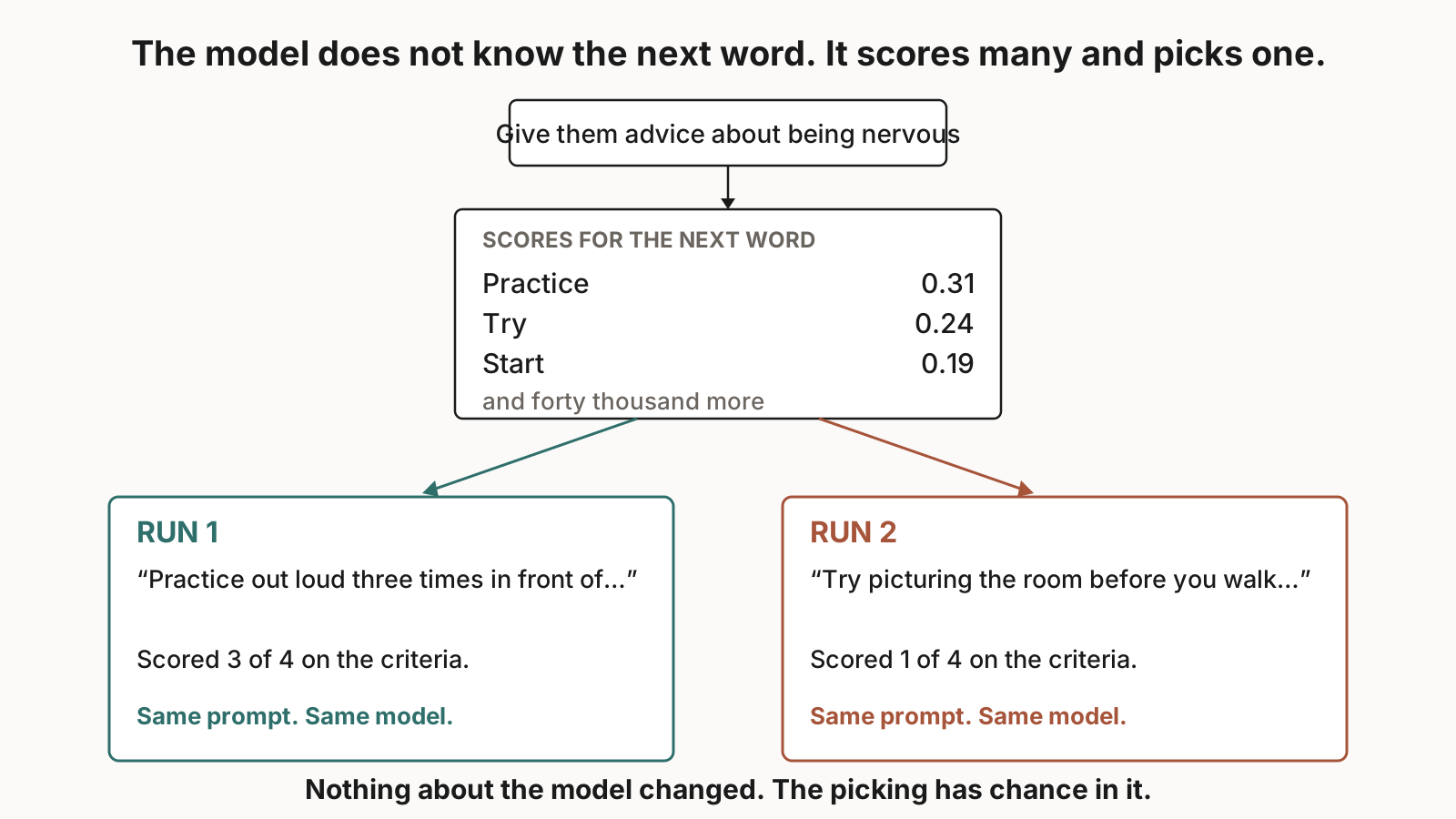
Same prompt, same model — different runs

Same prompt, same model — different runs

Same prompt to the same model, run twice. The two responses differ. The model does not know the next word — it scores many and picks one, and the picking has chance in it.

Schematic 3

Inside the machine

Inside the machine

Storage, RAM, and the processor — the three parts that decide whether a model can run.

Schematic 4

Numbers, not instructions

Numbers, not instructions

A program contains steps a machine can follow. A model file contains only numbers.

Schematic 5

The software stack

The software stack

Hardware sits under an operating system. On top of the OS sits a runtime. On top of the runtime sits whatever program a person opens.

Schematic 6

The life of a model

The life of a model

From training to a file on disk to loading into memory to producing tokens.

Schematic 7

What a parameter is

What a parameter is

A parameter is a single number inside the model file. A model has millions or billions of them.

Schematic 8

The arithmetic

The arithmetic

What a model actually does — matrix math on the numbers in the file.

Schematic 9

What a token is

What a token is

Text turns into tokens before the model sees it. A word can be one token or several.

Schematic 10

The loop

The loop

The model produces one token at a time in a loop until it decides to stop or hits a limit.

Schematic 11

Not always the top

Not always the top

The model does not always pick the highest-probability next token. It samples.

Schematic 12

Two layers of noise

Two layers of noise

Two sources of variation in the output — the sampling step and the input the student typed.

Schematic 13

Kept and used

Kept and used

Two states side by side: the file kept in Storage, and the same file being worked on in VRAM. No arrow between them — the file does not travel. A copy exists in both places at once.

Schematic 14

What load actually is

What load actually is

The wrong picture and the right picture, side by side. Load means COPY into VRAM. The file on the disk stays put; a duplicate appears in the fast memory the processor can reach.

Schematic 15

Will it fit? — Chromebook

Will it fit? — Chromebook

First panel of the ladder. The classroom Chromebook has 4 GB of RAM. A 6.63 GB model file does not fit.

Schematic 16

Will it fit? — RTX 4060

Will it fit? — RTX 4060

Second panel. An RTX 4060 has 8 GB of VRAM. A 6.63 GB model file fits.

Schematic 17

Will it fit? — RTX 5070 Ti

Will it fit? — RTX 5070 Ti

Third panel. An RTX 5070 Ti has 16 GB of VRAM. A 6.63 GB model file fits with room to spare.

Schematic 18

Will it fit? — RTX 4090

Will it fit? — RTX 4090

Fourth panel. An RTX 4090 has 24 GB of VRAM. A 6.63 GB model file fits easily.

Schematic 19

The ladder

The ladder

All four machines side by side with verdicts. Three cards can hold the 6.63 GB model file; the Chromebook comes up 2.63 GB short. This is the number that decides whether a machine can run the model.

Schematic 20

Training as a loop

Training as a loop

A recycling conveyor and the training loop drawn as four boxes with a dashed return arrow: GUESS, CHECK, WRONG, NUDGE. At the end the photographs are crossed out and only the numbers remain — the model file is what training leaves behind.

Schematic 21

Three counts of the same sentence

Three counts of the same sentence

One sentence shown three ways — characters, words, tokens. Three different numbers for the same text, with the token count boxed heaviest because it is the only one the model receives.

Schematic 22

Token → ID → coordinates

Token → ID → coordinates

Three steps. A token is turned into an arbitrary ID number. The ID looks up a list of coordinates. The coordinates get plotted — words that mean similar things cluster together (cat, dog, kitten) and words that mean different things sit far apart.

Schematic 23

Count the R's

Count the R's

Top row: ten letter boxes as you see them. Bottom row: two tokens, then two numbers — what the model actually receives. The question in the dashed box points at an input with no letters in it.

Schematic 24

What Week 1 told us

What Week 1 told us

Three bands. The experiment as run, with CHANGED flags on both rows of both machines. The class conclusion, crossed out. The version never run, with one variable moving and one held — what a fair comparison would have looked like.

Schematic 25

Pew broke the line

Pew broke the line

A tokenization break-down. When an unusual word arrives, the tokenizer chops it into pieces the model has seen before — and the count and shape of those pieces stops matching what a person would count.
Mid Term Prep Day 2 · HTML, CSS, JavaScript on the Same Page

Sep 15 – 18, 2026

Reading passages

Each passage prints above its cluster of four items on the test.

Passage 1

Three grammars on one screen

A web page is written in three languages, and you can tell them apart the same way you tell nouns from adjectives from verbs. HTML is nouns and prepositional phrases — it says what a part is and where it sits. CSS is adjectives — it says what a part already named looks like. You cannot put an adjective on nothing; HTML has to come first. JavaScript is verbs and adverbs — it says what a part does. A verb needs a noun. Something has to be there before it can do anything.

Passage 2

The first language

HTML is the first language a page speaks. It names the parts and says where they sit. A paddle at the bottom of the play area. A score box in the top right corner. HTML alone would produce a screen full of labeled boxes stacked in the order you wrote them, with no color and no motion. That is fine — that is what HTML does. Everything else is decoration or behavior on top of a page that already has parts.

Passage 3

The adjective layer

CSS is the adjective layer. It says what a part that HTML already named looks like. Bright orange, small, rounded, bold, centered against the top edge. You cannot put an adjective on nothing; the noun has to be there before the adjective can attach. HTML has to come first for CSS to have anything to work on. That is the layer order — HTML first, then CSS on top of HTML.

Passage 4

The verb layer

JavaScript is the verb layer, and every verb needs a when-clause. The paddle moves left when the left arrow key is pressed. The game starts when the Start button is clicked. The score adds 10 when the ball hits a brick. The verb by itself — moves, starts, adds — has no trigger, and the browser has nothing to listen for. The when-clause is not optional. JavaScript also needs a noun to act on, so JavaScript sits on top of HTML too.

Anchors

Short claim panels the item pool draws from. Recognize them; the test items will paraphrase and vary.

Anchor 1

A page is three files

HTML, CSS, and JavaScript are three separate files on a server. When the browser asks for a page, the server sends them over the network. All three run on the client — in the browser on the computer in front of you.

Anchor 2

The browser is a program the OS runs

Chrome, Safari, Firefox — each is a program the operating system launches when a user double-clicks it. The OS gives the browser a slice of RAM and CPU time. Everything a page does happens inside that program.

Anchor 3

The DOM lives in RAM

The browser reads the HTML file top to bottom and builds a tree in memory called the DOM. Every tag becomes a node. The tree lives in the browser program's RAM and is what CSS attaches to and what JavaScript can grab and change.

Anchor 4

Rendering may use the GPU

Once the DOM is built and CSS is applied, the browser paints pixels on the screen. Modern browsers hand painting work to the GPU when they can — animations, transitions, and scrolling are often GPU-accelerated.

Anchor 5

JavaScript runs in an engine

V8 in Chrome, JavaScriptCore in Safari, SpiderMonkey in Firefox. The JS engine is a program inside the browser program. It runs on the CPU. Events like clicks and keypresses arrive as items in a queue the engine pulls from.

Anchor 6

Layer order — HTML, then CSS, then JavaScript

HTML first, CSS on top, JavaScript on top of that. You can write CSS all day, and if no HTML noun matches, nothing changes. You can write JavaScript all day, and if no HTML noun exists, there is nothing to bind to.

Anchor 7

The cross-out test

Take a sentence about part of a page. Cross out the CSS words (adjectives). Cross out the JavaScript words (verbs + when-clauses). What is left is the HTML — a noun and a where-phrase. That is the shape.

Anchor 8

Client and server

A webpage runs in two places at once. Part runs on a server whose job is to answer requests. Part runs on the client — the browser on the machine in front of you. The three grammars run on the client. The server did the sending.

Anchor 9

The request cycle

You type an address. The browser asks DNS for its actual location on the internet. The browser sends a request across the network to the server. The server sends back HTML. If the HTML links to CSS or JavaScript, the browser makes more requests.

Anchor 10

File extensions

A file extension is the short part after the dot — a hint to the operating system about what kind of file it is. `.html` is a webpage description. `.css` is a stylesheet. `.js` is JavaScript. `.md` is Markdown. `.json` is structured data. `.gs` is Google Apps Script.

Schematics

Diagrams that appear in items on the test. Study the labels; questions will name them.

Schematic 1

What the cloud is

What the cloud is

The cloud is other people's computers — servers whose job is to answer requests.

Schematic 2

How you are connected

How you are connected

The client machine, the router, the internet provider, and the server on the far end of the trip.

Schematic 3

The hops

The hops

A request from a browser to a webpage travels through a small number of steps in order.

Schematic 4

The good Chromebook

The good Chromebook

A Chromebook is a client machine — it runs a browser but does not run a full desktop OS.

Schematic 5

The same machine, labelled

The same machine, labelled

The parts of the client machine and where the browser sits among them.

Schematic 6

The same map

The same map

A machine in a spare room in New Orleans and a data center on the other side of the country sit on the same map. The difference is how many, not what kind — the client and the server are both ordinary computers.

Mid Term Prep Day 3 · Specifying a Program in Natural Language

Sep 21 – 25, 2026

Reading passages

Each passage prints above its cluster of four items on the test.

Passage 1

The form is your project's repo

Programmers use a system called a repository — a repo — to keep the durable version of what they build. When they make a change, they commit it, so today's version and tomorrow's are both preserved. This week, your Google Form is your repo. Every time you learn something new about your game, you open the form and commit — you update the form with what you learned. Whatever is in your form on Friday is what gets graded. Whatever is not in the form does not exist.

Passage 2

The NPC test and the wall

An NPC is a non-playable component — a part of the screen a player sees but that never changes during play. A wall. A score box. A title banner. If it moves, reacts, or changes state, it belongs in Folder 4 (Interactive Elements), not Folder 3 (NPCs). Folder 3 gets an HTML sentence (noun and place) and a CSS sentence (one adjective) for each element. Minimum of five elements. That is the wall — the rule that decides which folder every part of the screen belongs in.

Anchors

Short claim panels the item pool draws from. Recognize them; the test items will paraphrase and vary.

Anchor 1

Codestral is a model file

Codestral is a code-writing model. Like Lab 1's panes, it is bytes on disk, measured in gigabytes, frozen once trained. Same file idea, different job — its output is source code you can open in a browser.

Anchor 2

Prompt as specification

A prompt is a text input to a model. A specification is a longer, more careful prompt that describes what a program should be. The four-folder proto-spec is a structured spec — each folder holds a different kind of statement Codestral consumes.

Anchor 3

The four folders

Folder 1 · Overview and Logic. Folder 2 · Playing Canvas. Folder 3 · Non-Playable Components. Folder 4 · Scripts and Behavior. Each folder holds a specific kind of description. Every noun in the pitch has to appear as an NPC or an Interactive Element or Codestral has nothing to render.

Anchor 4

The compile step

Compile is the step where a spec turns into running code. The spec goes in as text; a single HTML file comes out. The compile step is a program (Codestral) running on the server's hardware — its CPU, its RAM, its VRAM. Latency comes from model size and hardware speed.

Anchor 5

Codestral's defaults

When a spec is vague, Codestral falls back to defaults — a plain div with no color, no motion, no event bindings, generic layouts. Naming a famous game does not summon it. The model only renders what the spec describes.

Anchor 6

Verb + when-clause

Every JavaScript verb in Folder 4 needs a when-clause. Moves alone has no trigger — Codestral binds no event. Moves when the left arrow key is pressed has a trigger, and Codestral can wire it to a real event listener.

Anchor 7

The reproducibility test

A well-formed spec should re-compile to approximately the same output. Nondeterminism is present (as in Lab 1), but a tight spec constrains the model enough that outputs converge. A sloppy spec leaves the model choosing among many valid completions, and outputs diverge.

Anchor 8

The NPC test

Does it change during play? If no → NPC (Folder 3). If yes → Interactive Element (Folder 4). A paddle you slide is not an NPC. A wall the ball hits is an NPC. A ball is an Interactive Element. A background gradient that never reacts is Playing Canvas (Folder 2).

Anchor 9

Layer separation in specs

The three grammars carry into spec writing. HTML lines say what and where. CSS lines say what it looks like. JS lines say what it does when. A spec sentence like a paddle that slides mixes HTML (paddle) and JS (slides) — Codestral cannot bind because the noun and the behavior are entangled.

Schematics

Diagrams that appear in items on the test. Study the labels; questions will name them.

Schematic 1

The name is the spec

The name is the spec

Naming a thing precisely is the same skill as writing a spec — both constrain what the model produces.

Schematic 2

Same file, different behavior

Same file, different behavior

Two runs of the same file can produce different behavior. Reproducibility comes from constraining the input.

Schematic 3

The hole in the spec

The hole in the spec

Under-specified parts leave holes. Codestral fills those holes with defaults.